
Driving the DA-Board
Some example code (comnposed by Claude AI):
Provides you with 16 faders and 32 presets.
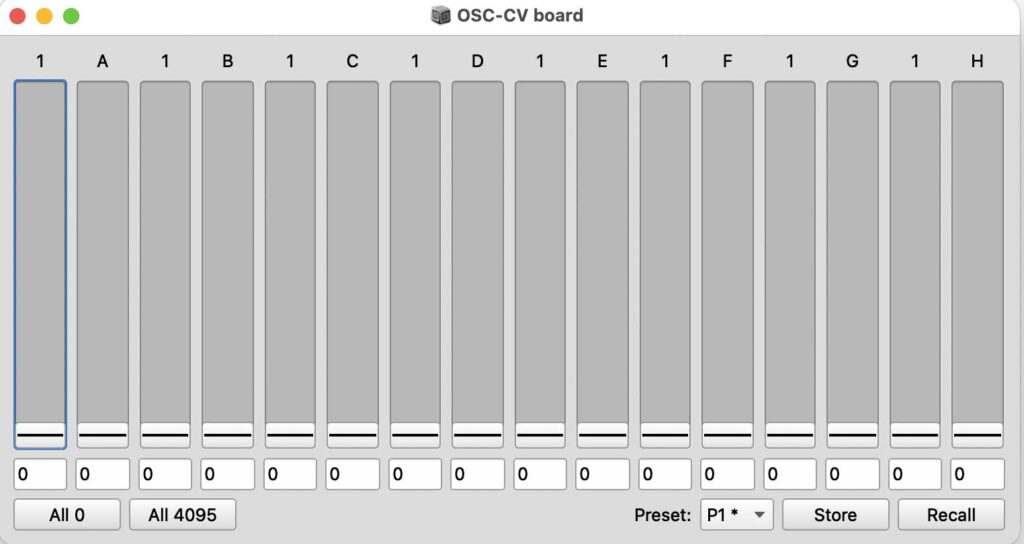
// OSC-CV board (Ipson) - 16 x 12-bit CV outputs
// Message: /v1 + 8 int32, each int = (chA << 16) + chB
// Run the whole block (cursor inside, Cmd/Ctrl+Enter)

(
// ---- settings ----
~ip   = "192.168.2.27";   // IP of the IpsonCompact (Xport)
~port = 8000;          // OSC port of the IpsonCompact
~rate = 50;             // max send rate in Hz

// ---- state ----
~net   = NetAddr(~ip, ~port);
~cv    = Array.fill(16, 0);
~dirty = true;
~names = ["1", "2"].collect { |b| "ABCDEFGH".collectAs({ |c| b ++ c }, Array) }.flat;

// ---- send ----
~send = {
    var ints = 8.collect { |i|
        ((~cv[i * 2] & 4095) << 16) + (~cv[i * 2 + 1] & 4095)
    };
    ~net.sendMsg('/v1', *ints);
};

// ---- GUI ----
~win = Window("OSC-CV board", Rect(100, 100, 760, 380));
~sl = Array.newClear(16);
~nb = Array.newClear(16);

~set = { |i, v|
    v = v.asInteger.clip(0, 4095);
    ~cv[i] = v;
    ~sl[i].value = v / 4095;
    ~nb[i].value = v;
    ~dirty = true;
};

~strips = 16.collect { |i|
    ~sl[i] = Slider().orientation_(\vertical)
        .action_({ |s| ~set.(i, (s.value * 4095).round) });
    ~nb[i] = NumberBox().clipLo_(0).clipHi_(4095).decimals_(0)
        .action_({ |n| ~set.(i, n.value) });
    VLayout(StaticText().string_(~names[i]).align_(\center), [~sl[i], stretch: 1], ~nb[i]);
};

// ---- presets (16 slots, saved to disk automatically) ----
~presetFile = Platform.userAppSupportDir +/+ "osc_cv_presets.scdata";
~presets = if(File.exists(~presetFile)) { Object.readArchive(~presetFile) } { Array.newClear(16) };
~slotNames = { 16.collect { |i| "P" ++ (i + 1) ++ (if(~presets[i].notNil) { " *" } { "" }) } };
~menu = PopUpMenu().items_(~slotNames.());

~store = { |n|
    ~presets[n] = ~cv.copy;
    ~presets.writeArchive(~presetFile);
    ~menu.items_(~slotNames.()).value_(n);
    ("stored P" ++ (n + 1)).postln;
};
~recall = { |n|
    var p = ~presets[n];
    if(p.notNil) { 16.do { |i| ~set.(i, p[i]) } } { ("P" ++ (n + 1) ++ " is empty").postln };
};

~win.layout = VLayout(
    [HLayout(*~strips), stretch: 1],
    HLayout(
        Button().states_([["All 0"]]).action_({ 16.do { |i| ~set.(i, 0) } }),
        Button().states_([["All 4095"]]).action_({ 16.do { |i| ~set.(i, 4095) } }),
        nil,
        StaticText().string_("Preset:"),
        ~menu,
        Button().states_([["Store"]]).action_({ ~store.(~menu.value) }),
        Button().states_([["Recall"]]).action_({ ~recall.(~menu.value) })
    )
);

// ---- sender: only sends when something changed ----
~task = Routine({
    loop {
        if(~dirty) { ~send.(); ~dirty = false };
        (1 / ~rate).wait;
    }
}).play;

~win.onClose = { ~task.stop };
~win.front;
)

// Set a channel from code (index 0-15 = 1A..2H):
// ~set.(0, 2048);

// Presets from code (slot 0-15 = P1..P16):
// ~store.(0);
// ~recall.(0);
Code example for driving the OSC-CV convertor in Sonology VCS (Voltage Controlled Studio)
//Start code:
 /// BEA5 OSC Connector provides a GUI with 8 sliders that are used to send data to the patch bay in BEA5. /
 /// Each slider is mapped to an OSC value between 0 and 4095. ///
 /// These are then converted in the patch bay to a voltage of 0-5 V ///
 /// User Instructions: ///
 /// 1. Run the Global Vars code ///
 /// 2. Run the GUI code ///
 /// 3. Run the Routine ///
 /// 4. Play with the sliders ///
 /////////////////////////////////////////////////////////////////////////////////////////////////////////////

/// Global Vars ///

(

~host = "10.1.60.34"; /// BEA5 ip

~port = 10001; ///// BEA5 port

~netAddr = NetAddr.new(~host, ~port);

~speed = 50 //in Hz

)

/// GUI ///

(

~sliders = [0, 0, 0, 0, 0, 0, 0, 0];

n = ~sliders.size;

w = Window("BEA5 OSC COnnector", Rect(700, 300, 530, 370));

m = MultiSliderView(w,Rect(10,10,510,350));

m.value= ~sliders;

m.isFilled_(true);

m.indexThumbSize_(60);

m.gap_(4);

w.front;

m.action = { arg q;

~sliders = (q.value * 4095).asInteger;

};

)

/// Routine sends data to Patch Bay ///

(

Routine.new({

inf.do({

var values, outgoingMsg;

values = [0, 0, 0, 0];

4.do({ arg i;

var s1, s2, value;

s1 = (~sliders[i*2] & 4095) << 16;

s2 = ~sliders[(i*2)+1] & 4095;

value = s1 + s2;

values.put(i, value);

});

outgoingMsg = ['/1', values[0], values[1], values[2], values[3]];

outgoingMsg.postln;

~netAddr.sendMsg(*outgoingMsg);

(1/~speed).wait;

})

}).play();

)

//EndCode